
SILICON VALLEY — At its annual developer showcase, Google officially pulled back the curtain on Android 17, signaling the most radical architectural shift in the operating system’s history. Moving past the era of mobile OS frameworks that treat artificial intelligence as an application-layer add-on, Android 17 is built from the ground up as an AI-native ecosystem.
With the software officially reaching Platform Stability in its latest developer preview, the tech industry is getting an exhaustive look at how Google intends to redefine mobile computing, cross-platform communication, and hardware-level security.
1. The Core AI Engine: Deep System Integration
Where previous iterations relied on cloud-based API calls or isolated on-device machine learning modules, Android 17 introduces a unified intelligence layer deeply embedded into the system’s core runtime environment.
Advanced Generative UI with “Create My Widget”
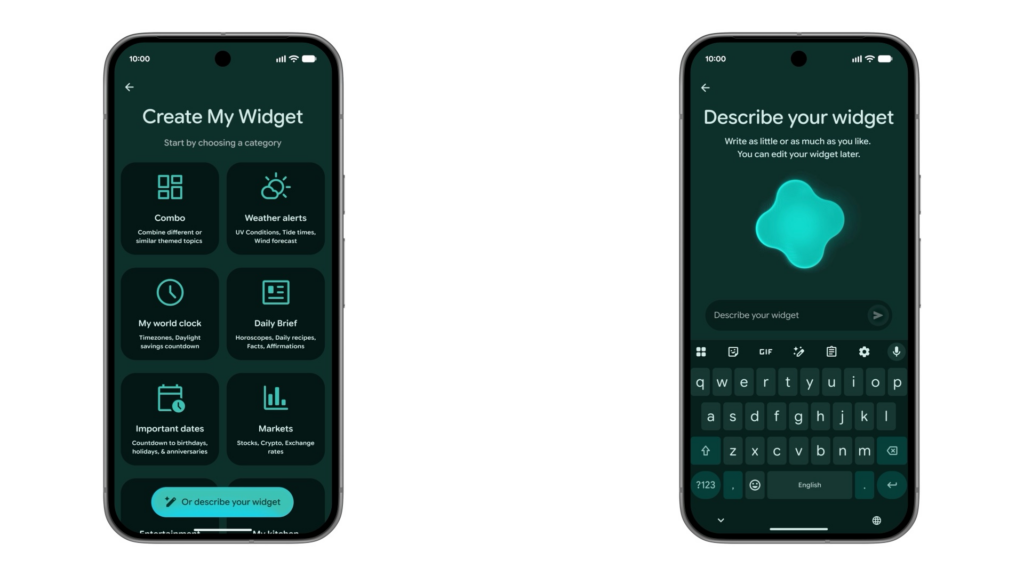
Android 17 completely redefines user interface customization by transitioning from static, pre-designed widgets to real-time generative assets. Powered by an on-device iteration of the Gemini Nano model, users can long-press the home screen and input complex, natural language prompts.
- The Technology: Rather than just pulling template assets, the system dynamically compiles code to build highly specific user interfaces on the fly.
- Example Use Case: A user can request a “minimalist, data-dense widget tracking real-time local UV index, bicycle commuting wind resistance factors, and a live breakdown of daily macronutrient tracking.” The OS autonomously fetches APIs, structures the layout, and renders a native widget matching the system’s overall Material You color palette.
System-Wide Voice Refinement: Rambler Dictation
Traditional voice-to-text algorithms have long struggled with the messy reality of human speech. Android 17 introduces Rambler, a system-level dictation engine designed to act as an active, real-time editor.
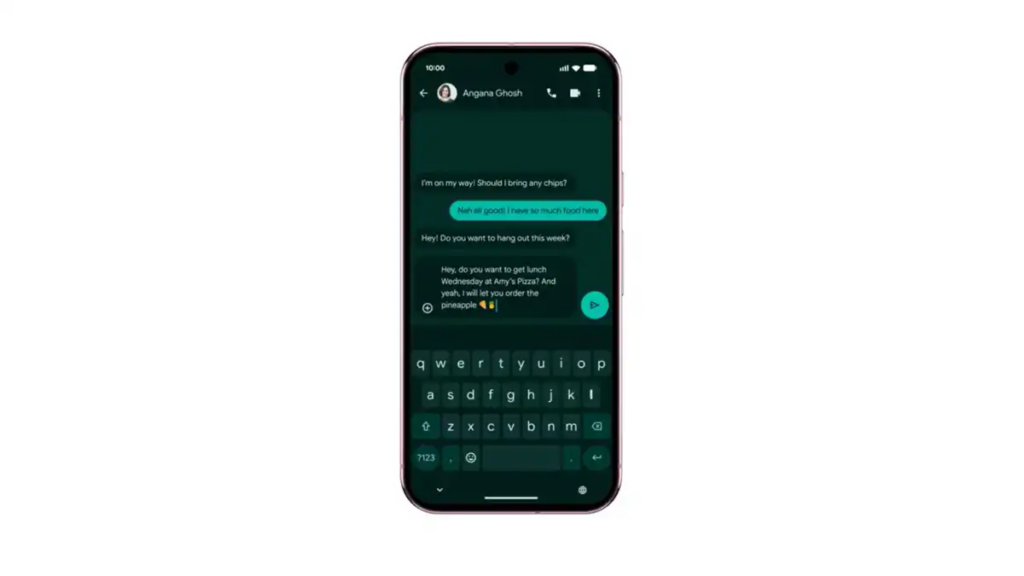
- Contextual Filtering: Rambler automatically identifies and strips out filler words (“um,” “uh,” “like”), non-verbal pauses, and mid-sentence stutters.
- Dynamic Grammar and Tone Correction: If a user stumbles through a sentence, Rambler reconstructs the phrase into grammatically flawless prose while preserving the user’s intent.
- Native Multilingual Switching: The engine processes code-switching seamlessly. A user can alternate between English, Spanish, Bengali, or German within a single sentence without needing to manually toggle keyboard language inputs, a major milestone for global users.
Multi-Step Agentic Automation
Android 17 opens up system-level access for AI agents to navigate the user interface on your behalf. Utilizing advanced on-screen context awareness, the device can execute multi-app workflows. For instance, you can point the camera at a physical, handwritten grocery list, and the system-level AI will automatically open your preferred grocery delivery app, search for the items, add them to the cart, and wait at the final checkout screen for your biometric authentication.
2. Desktop-Class Multitasking and UI Overhaul
As large-screen foldables and productivity-focused tablets continue to capture market share, Google has used Android 17 to phase out traditional, rigid mobile windowing constraints.
The Evolution of App Bubbles
What began years ago as a niche feature for chat applications has been completely re-engineered into a desktop-class windowing manager. Android 17 allows any application to be minimized into a floating, resizable, and stackable “Bubble.”
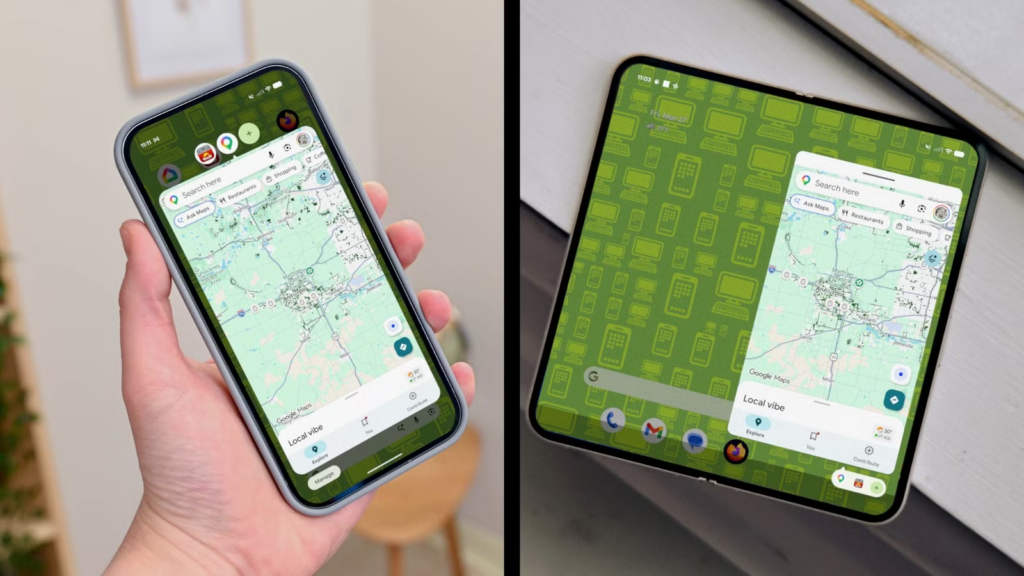
For standard smartphones, these bubbles hover unobtrusively at the edge of the display, allowing users to keep reference materials, calculators, or media players active while working in a primary application. On foldable displays and tablets, Android 17 introduces a dedicated persistent Bubble Bar integrated directly into the system taskbar, allowing users to pin, group, and dock floating windows with drag-and-drop ease.
The Frosted Glass Aesthetic
Visually, the operating system graduates to a more sophisticated design language characterized by high-fidelity blur effects and a premium “frosted glass” aesthetic. Deeply tied to the hardware’s GPU rendering pipeline, this look ensures that overlapping windows, notification shades, and quick-setting panels adapt their transparency, lighting reflection, and background diffusion dynamically based on what is behind them, maintaining smooth 120Hz performance.
3. Cognitive Health & Advanced Creator Toolkits
Recognizing the growing concern over digital fatigue and screen addiction, Android 17 pivots away from passive statistics tracking toward active intervention, while simultaneously boosting productivity for mobile content creators.
Digital Guardrails: Pause Point
While older “Digital Wellbeing” features simply locked users out of apps after a set time limit—a restriction easily bypassed with a few clicks—Pause Point introduces psychological friction.
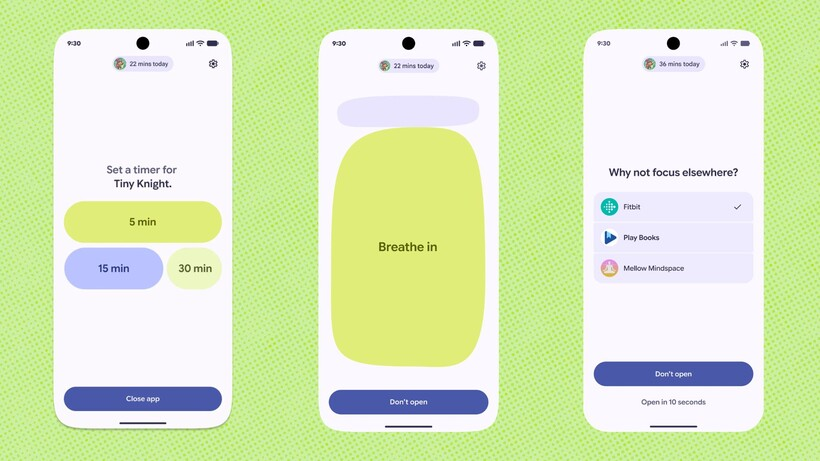
- When a user attempts to open a flagged “distracting” application (such as a social media algorithm feed), the OS interrupts the launch with a mandatory, un-skippable 10-second delay.
- During this window, the screen dims and displays calming breathing exercises or direct, text-based prompts asking the user if they truly want to spend time on the app. Early developer feedback suggests this brief moment of cognitive friction drastically cuts down on compulsive, subconscious app-tapping.
Screen Reactions for Mobile Creators
To cater to the massive creator economy, Android 17 integrates system-level picture-in-picture screen recording. Dubbed Screen Reactions, the feature lets users record high-resolution internal device audio and screen capture while simultaneously mapping a circular, floating selfie-camera cutout of their face.
- The camera feed utilizes background blur, automatic framing, and gaze-correction technologies to ensure studio-like quality.
- Because it is baked directly into the Android media framework rather than a third-party application, it operates with zero thermal throttling or frame drops, making it an essential tool for software reviewers, mobile gamers, and educators.
4. Aggressively Dismantling the Ecosystem Divide
In an unprecedented strategic shift, Google is using Android 17 to target ecosystem lock-in, building direct bridges to competing operating systems—most notably Apple’s iOS.
Local Cross-Platform Sharing via Quick Share
Recognizing that local file sharing remains a major pain point for mixed-device groups, Google has updated Quick Share to operate outside the boundaries of the Android/ChromeOS environment.
- Android 17 devices can host a hyper-localized, secure Wi-Fi hotspot specifically for ad-hoc data transfers.
- When sharing a file, the OS can generate a secure, temporary dynamic QR code. An iPhone user can scan this code to instantly connect to the local WebRTC stream, downloading uncompressed, high-resolution videos, photos, or documents directly via their native browser without needing external apps or cloud storage intermediaries.
The Zero-Friction Migration Wizard
Partnering with recent global regulatory shifts in mobile architecture, Android 17 introduces a highly advanced wireless migration framework. When switching from an iPhone to an Android 17 device, the platform can securely clone local messages, call histories, photo metadata, and even cross-map and download equivalent Android versions of a user’s iOS application library. Most impressively, the wizard now supports direct eSIM transferring, removing the need to visit carrier portals or physical retail stores during a device upgrade.
5. Next-Generation Security: Post-Quantum and Theft Protection
As cyber threats grow increasingly sophisticated, the underlying security architecture of Android 17 has received its most comprehensive hardening in half a decade.
Post-Quantum Cryptography (PQC)
With the advent of quantum computing threatening traditional encryption methods, Google is future-proofing user data today. Android 17 introduces system-wide Post-Quantum Cryptography keys within its keystore system. This ensures that encrypted communication, local biometric credentials, and financial data stored on the device are mathematically secure against advanced decryption tactics.
Real-Time AI Theft Detection
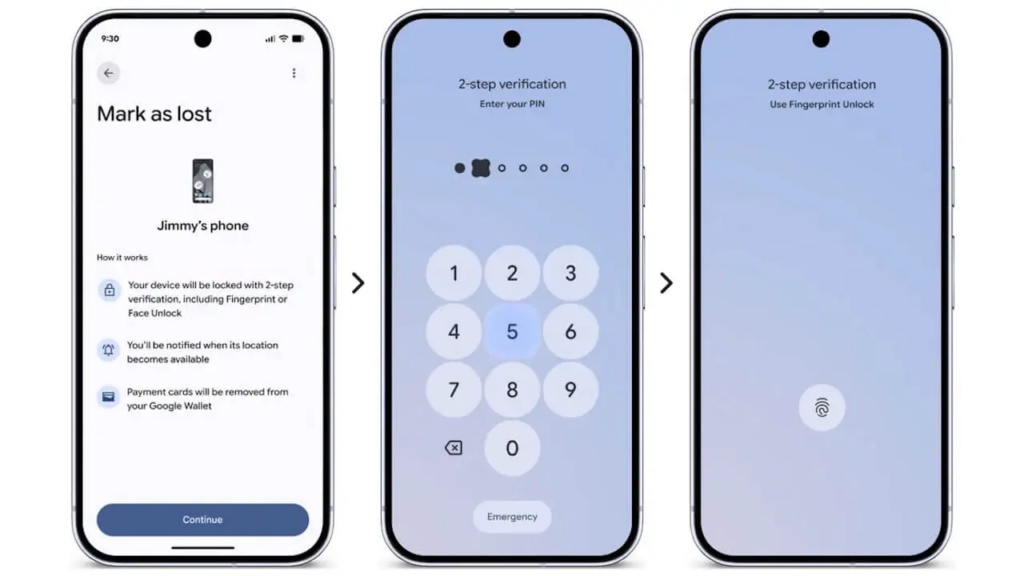
Building upon initial testing frameworks, Android 17 launches a mature, mandatory-by-default Theft Protection suite. Using the device’s high-frequency accelerometer, gyroscope, and ambient sensors, a localized machine learning model constantly monitors for physical movement signatures associated with common theft—such as a phone being violently snatched out of a walking user’s hand or a thief speeding away on a bike or car.
| Feature Status | Security Layer | Action Triggered |
| Snatched Device | Motion AI Sensor | Instantly locks the display and requires biometric-only authentication. |
| Offline Isolation | Network Monitor | Shuts down wireless radios if the device is taken offline abruptly to prevent remote tracking blocks. |
| Biometric Bypass Prevention | OS Core Security | Disables PIN/Pattern recovery if the device is in an unfamiliar geographic location. |
Furthermore, to combat the rise of targeted financial scams, Android 17 introduces a secure notification filter. One-Time Passwords (OTPs) and multi-factor authentication tokens are completely scrubbed from notification banners at the system level. This prevents malicious third-party apps with notification-reading permissions from harvesting security codes.
6. Global Rollout and System Requirements
The stable, commercial release of Android 17 is officially slated to begin its rollout in June 2026.
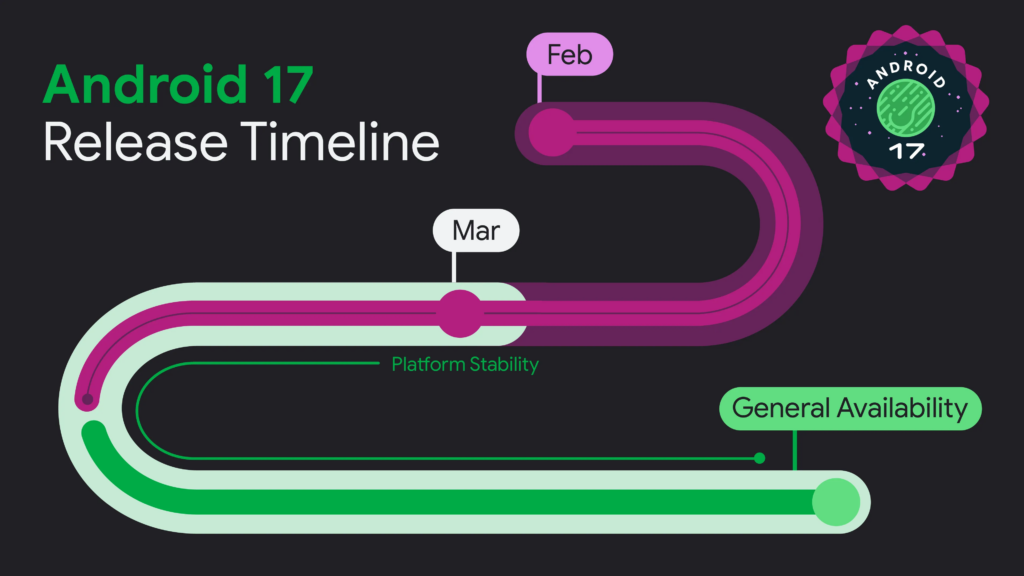
Google’s flagship Pixel lineup will be the first to receive the over-the-air (OTA) update, alongside next-generation silicon flagships from partners like Samsung, OnePlus, and Xiaomi. Due to the heavy reliance on localized NPU (Neural Processing Unit) performance for features like Rambler and generative widgets, certain legacy devices may see a tiered rollout, with cloud-fallback options provided for older chipsets.
For enterprise environments and developers, the final APIs are locked, and compatibility testing environments are currently live via the official Android Studio emulator toolsets.